My go-to text and code editor is Helix. Being a vim-like, it supports HJKL keys for cursor navigation, and I've gotten quite used to this over the last couple years, to the point where I'd like to have it across my OS. I never made much progress on it, but today I found a solution I'm happy with.
Recently I got a new Macbook with a Japanese keyboard layout - partly for the curiosity and partly because it has more keys than the typical ANSI layout, and also... because I needed a new laptop and and this was the easiest to acquire at the time.
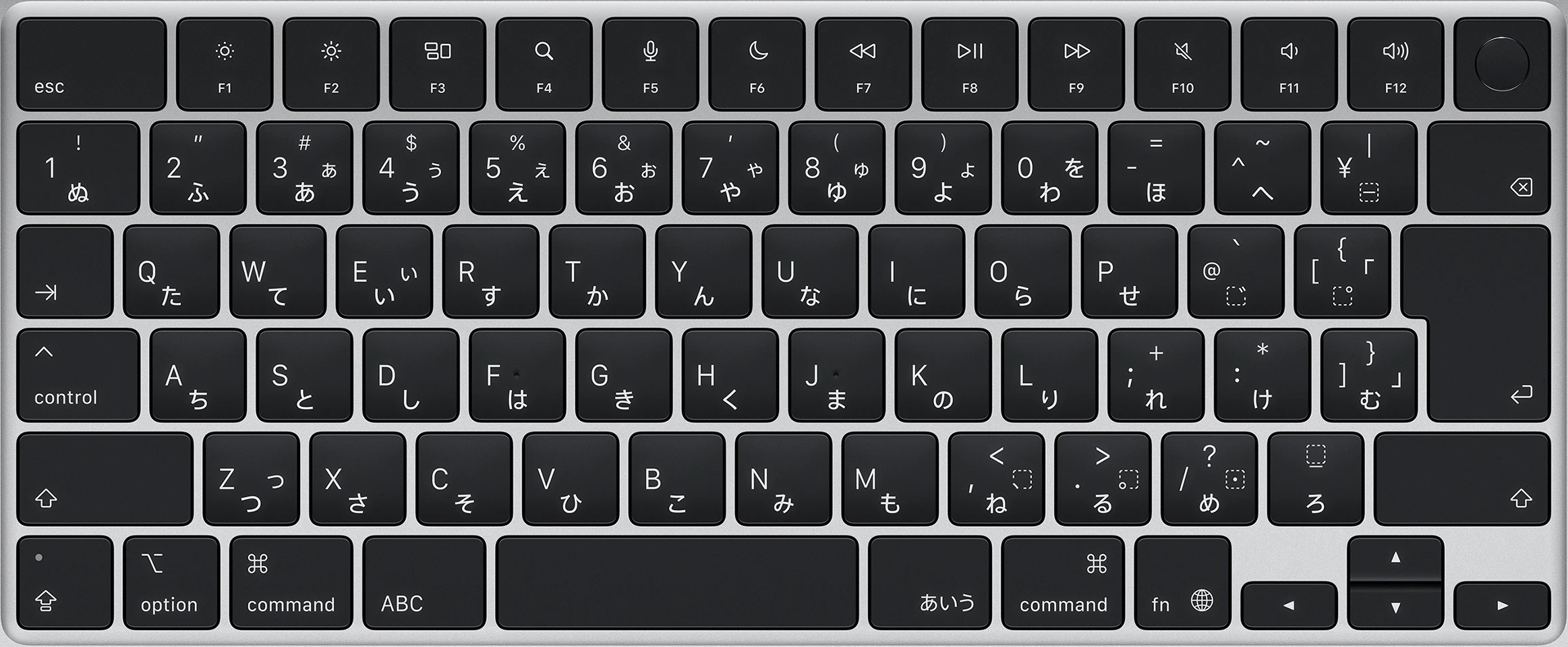
For reference, here is a picture of the Japanese keyboard on the M1 MacBook Air:
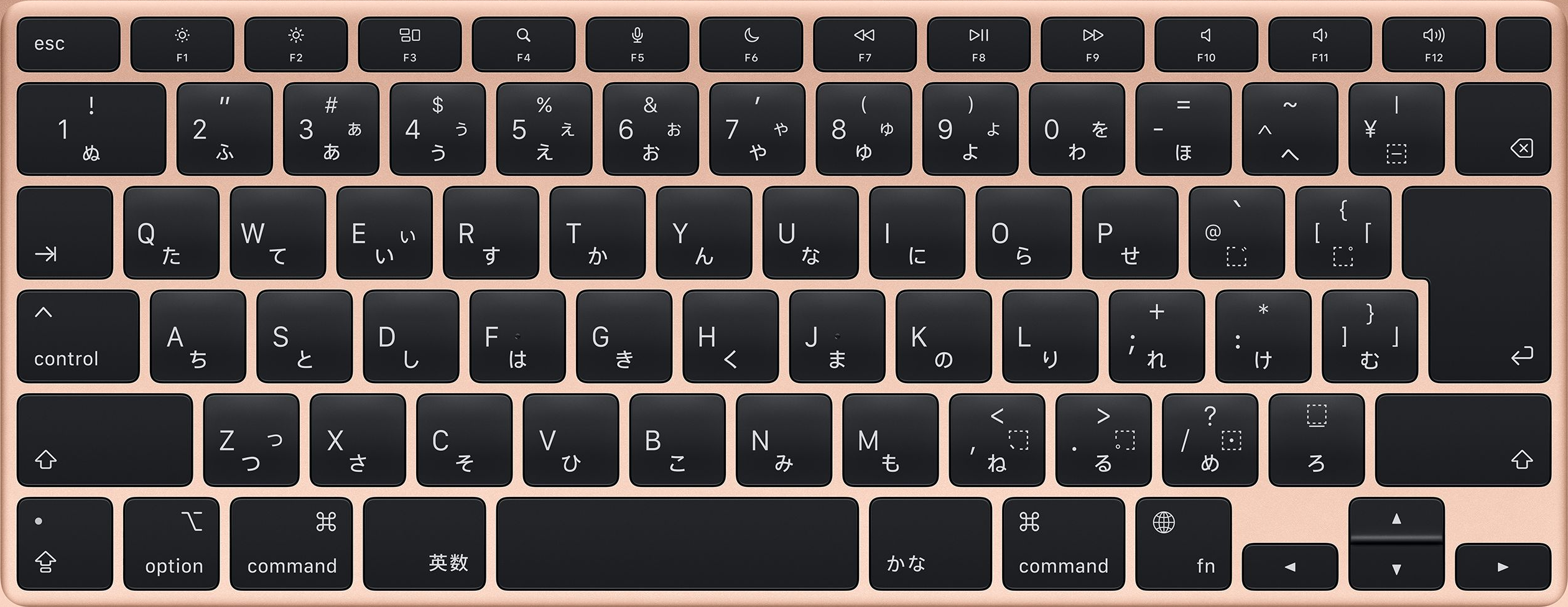
Later models (image) make some slight changes to the top row, trading part of the 1 key for a larger Delete key, but is still mostly the same as the 90s layout shown in Technote 1152.
This top row was probably what took me the longest to get used to. On a PC JIS keyboard, the top left key is the 半角/全角 (lit. "half-width/full-width", or input mode switcher) key. Apple removed this key to prefer the thumb-accessible 英数 (lit. "eisuu", used for switching to typing alphanumeric characters) and かな (lit. "kana", used for switching to Japanese input method) keys; at which point it's a reasonable decision to just lengthen the next key, as there isn't any other key that could go there and having a blank space would be odd.
Coming from an ANSI keyboard this wasn't immediately obvious though, and I still instinctively try to hit "the key to the left of number 1" sometimes.
Karabiner-Elements came in handy for remapping keys: the かな and right Function keys came in handy as Option and Control respectively; the Caps Lock key, at the bottom left of the keyboard, became the Function key found at the same location on the ANSI layout, and pressing the Shift key twice quickly doubled (get it?) as toggling Caps Lock via a simple rule.
No, I didn't remap Control to Escape; I actually find shortcuts such as Control+C much more comfortable in that position - with the tradeoff that the Option key is now harder to access - though the right of the spacebar has its own Option key as well now.
The 英数 key remained unused for a while. I considered using it to toggle between input methods, but the usual Control+Space was good enough that I didn't feel like changing it.
After a bit, I came up with an idea: it could be used as a modifier for home row navigation! This was a bit complicated to set up as 英数 isn't natively a modifier key; virtual modifiers are an awkward solution but do work fine.
Karabiner-Elements uses a JSON format for configuring "complex modifications". Here is the rule script, annotated:
{
    "description": "japanese_eisuu activates hjkl navigation",
    "manipulators": [
        {
            "from": {
                // looking at the "japanese_eisuu" key...
                "key_code": "japanese_eisuu",
                // optionally, with any other modifiers
                "modifiers": { "optional": ["any"] }
            },
            // when this key is pressed...
            "to": [
                {
                    // enable a custom toggle
                    "set_variable": {
                        "name": "home_row_navigation",
                        "value": 1
                    }
                }
            ],
            // when this key is released...
            "to_after_key_up": [
                {
                    // disable the custom toggle
                    "set_variable": {
                        "name": "home_row_navigation",
                        "value": 0
                    }
                }
            ],
            "type": "basic"
        },
        {
            // if the toggle "home_row_navigation" is enabled...
            "conditions": [ { "name": "home_row_navigation", "type": "variable_if", "value": 1 } ],
            // and the "h" key is pressed...
            "from": { "key_code": "h", "modifiers": { "optional": ["any"] } },
            // actually press the "left_arrow" key instead
            "to": [{ "key_code": "left_arrow" }],
            "type": "basic"
        },
        {
            // same as previous :)
            "conditions": [ { "name": "home_row_navigation", "type": "variable_if", "value": 1 } ],
            "from": { "key_code": "j", "modifiers": { "optional": ["any"] } },
            "to": [{ "key_code": "down_arrow" }],
            "type": "basic"
        },
        {
            "conditions": [ { "name": "home_row_navigation", "type": "variable_if", "value": 1 } ],
            "from": { "key_code": "k", "modifiers": { "optional": ["any"] } },
            "to": [{ "key_code": "up_arrow" }],
            "type": "basic"
        },
        {
            "conditions": [ { "name": "home_row_navigation", "type": "variable_if", "value": 1 } ],
            "from": { "key_code": "l", "modifiers": { "optional": ["any"] } },
            "to": [{ "key_code": "right_arrow" }],
            "type": "basic"
        }
    ]
}
Now I don't have to move my hand nearly as far to use arrow keys. It feels like such a small thing, but it really does makes typing just that bit more comfortable.